
As with all other tutorials in the c-tree series, each of these database programming tutorials is implemented with four simple code procedures: Initialize(), Define(), Manage(), and Done().
No matter which FairCom interface language you use, FairCom follows this same high-level flow in all tutorials. This makes it easy for developers to "cross-over" from one language interface to another as these basic concepts apply to all.
 |
Initialize() Every language requires some form of initial "logon" or "connection" procedure to establish a session with the database. This is done in the Initialize() stage of the program. |
 |
Define() Database definitions (DDL), Table/File schema definitions, Index definitions, Table/File creation, and Table/File open operations are all addressed in the Define() stage of the program. |
 |
Manage() This stage of the program is where the database is operated on, as in managing your data. Adding/Reading/Updating/Deleting records/rows are handled in this stage of the program. |
 |
Done() When the program ends, the database session should be closed. This stage handles the necessities to "de-init", by closing Tables/Files and issuing any required "logoff" or "disconnect" type procedures. |
Presented here are tutorials that follow the "Initialize(), Define(), Manage(), and Done()" approach.
You can also view similar tutorials for all supported languages online.
Introductory Tutorial
drivers\java.nav\tutorials\JTDB_Tutorial1.java
This tutorial will take you through the basic use of the FairCom DB API Java API.
As with all other examples in the c-tree tutorial series, this tutorial simplifies the creation and use of a database into four simple steps: Initialize(), Define(), Manage(), and You’re Done() !
Tutorial #1: Introductory - Simple Single Table
We wanted to keep this program as simple as possible. This program does the following:
- Initialize() - Connects to the FairCom Database Engine.
- Define() - Defines and creates a "customer master" (custmast) table/file.
- Manage() - Adds a few rows/records; Reads the rows/records back from the database; displays the column/field content; and then deletes the rows/records.
- Done() - Disconnects from FairCom Database Engine.
Note our simple logic:
public class JTDB_Tutorial1 {

static CTSession MySession;
static CTTable MyTable;
static CTRecord MyRecord;

public static void main(String[] args) throws IOException {
        // TODO code application logic here

        Initialize();

        Define();

        Manage();

        Done();

    }
We suggest opening the source code with your own editor.
 Continue now to review these four steps.
Init
First we need to open a connection to a database by providing the FairCom Database Engine with a user name, password and the database name.
Below is the code for Initialize():
    static void Initialize() throws IOException {
        System.out.println("INIT");

        try {
            // allocate objects
            MySession = new CTSession(SESSION_TYPE.CTREE);
            MyTable = new CTTable(MySession);
            MyRecord = new CTRecord(MyTable);
        } catch (CTException E) {
            Handle_Exception(E);
        }

        try {
            // connect to server
            System.out.println("\tLogon to server...");
            MySession.Logon("FAIRCOMS", "", "");
        } catch (CTException E) {
            Handle_Exception(E);
        }
    }
Define
Define() establishes specific data definitions. This involves defining columns/fields and creating the tables/files with optional indexes.
Below is the code for Define():
    //
    // Define()
    //
    // Open the table, if it exists. Otherwise create and open the table
    //
    static void Define() throws IOException {
        boolean do_create = false;

        System.out.println("DEFINE");

        try {
            System.out.println("\tOpen table...");
            MyTable.Open("custmast", OPEN_MODE.NORMAL);
        } catch (CTException E) {
            // table does not exist. Try to create it
            do_create = true;
        }

        if (do_create) {
            // create the table
            System.out.println("\tAdd fields...");
            try {
                MyTable.AddField("cm_custnumb", FIELD_TYPE.CHARS, 4);
                MyTable.AddField("cm_custzipc", FIELD_TYPE.CHARS, 9);
                MyTable.AddField("cm_custstat", FIELD_TYPE.CHARS, 2);
                MyTable.AddField("cm_custrtng", FIELD_TYPE.CHARS, 1);
                MyTable.AddField("cm_custname", FIELD_TYPE.VARCHAR, 47);
                MyTable.AddField("cm_custaddr", FIELD_TYPE.VARCHAR, 47);
                MyTable.AddField("cm_custcity", FIELD_TYPE.VARCHAR, 47);

                System.out.println("\tCreate table...");
                MyTable.Create("custmast", CREATE_MODE.NORMAL);

                MyTable.Open("custmast", OPEN_MODE.NORMAL);
            } catch (CTException E) {
                Handle_Exception(E);
            }
        } else {
            Check_Table_Mode(MyTable);
        }
    }
Manage
Manage() provides data management functionality for your application and/or process.
Below is the code for Manage():
    //
    // Manage()
    //
    // This function performs simple record functions of add, delete and gets
    //
    static void Manage() throws IOException {
        System.out.println("MANAGE");

        // delete any existing records
        Delete_Records();

        // populate the table with data
        Add_Records();

        // display contents of table
        Display_Records();
    }
Done
When an application and/or process has completed operations with the database, it must release resources by closing the open files and disconnecting from the database engine.
Below is the code for Done():
    //
    // Done()
    //
    // This function handles the housekeeping of closing, freeing,
    // disconnecting and logging out of the database
    //
    static void Done() throws IOException {
        System.out.println("DONE");

        try {
            // close table
            System.out.println("\tClose table...");
            MyTable.Close();

            // logout
            System.out.println("\tLogout...");
            MySession.Logoff();

            // This section is only needed for the AppServer DLL model.
            // Stop the AppServer DatabaseEngine
            boolean AppServerModel = true;
            if (AppServerModel) {
                CTSession.StopDatabaseEngine();
            }

        } catch (CTException E) {
            Handle_Exception(E);
        }
    }
Relationships
drivers\java.nav\tutorials\JTDB_Tutorial2.java
Now we will build some table/file relationships using the FairCom DB API Java API.
This tutorial will advance the concepts introduced in the first tutorial by expanding the number of tables. We will define key columns/fields and create specific indexes for each table to form a relational model database.
Like all other examples in the c-tree tutorial series, this tutorial simplifies the creation and use of a database into four simple steps: Initialize(), Define(), Manage(), and You’re Done() !
Tutorial #2: Relational Model and Indexing
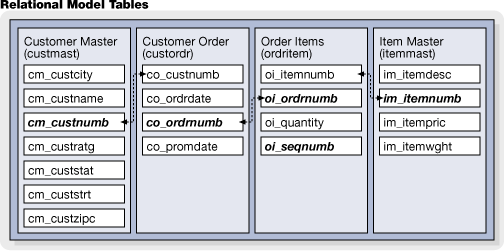
Here we add a bit more complexity, introducing multiple tables, with related indices in order to form a simple "relational" database simulating an Order Entry system. Here is an overview of what will be created:
- Initialize() - Connects to the FairCom Database Engine.
- Define() - Defines and creates the "custmast", "custordr", "ordritem" and the "itemmast" tables/files with related indexes.
- Manage() - Adds some related rows/records to all tables/files. Then queries the database.
- Done() - Disconnects from FairCom Database Engine.
Note our simple logic:
public class JTDB_Tutorial2 {

    static CTSession MySession;
    static CTTable tableCustOrdr;
    static CTTable tableOrdrItem;
    static CTTable tableItemMast;
    static CTTable tableCustMast;
    static CTRecord recordCustOrdr;
    static CTRecord recordOrdrItem;
    static CTRecord recordItemMast;
    static CTRecord recordCustMast;

    public static void main(String[] args) throws IOException {
        // TODO code application logic here

        Initialize();

        Define();

        Manage();

        Done();

    }
We suggest opening the source code with your own editor.
Continue now to review these four steps.
Init
First we need to open a connection to a database by providing the FairCom Database Engine with a user name, password and the database name.
Below is the code for Initialize():
    static void Initialize() throws IOException {
        System.out.println("INIT");

        try {
            // allocate the session object
            MySession = new CTSession(SESSION_TYPE.CTREE);

            // allocate the table objects
            tableCustOrdr = new CTTable(MySession);
            tableOrdrItem = new CTTable(MySession);
            tableItemMast = new CTTable(MySession);
            tableCustMast = new CTTable(MySession);

            // allocate the record objects
            recordCustOrdr = new CTRecord(tableCustOrdr);
            recordOrdrItem = new CTRecord(tableOrdrItem);
            recordItemMast = new CTRecord(tableItemMast);
            recordCustMast = new CTRecord(tableCustMast);
        } catch (CTException E) {
            Handle_Exception(E);
        }

        try {
            // connect to server
            System.out.println("\tLogon to server...");
            MySession.Logon("FAIRCOMS", "", "");
        } catch (CTException E) {
            Handle_Exception(E);
        }
    }
Define
Define() establishes specific data definitions. This involves defining columns/fields and creating the tables/files with optional indexes.
Below is the code for Define():
    //
    // Define()
    //
    // Open the table, if it exists. Otherwise create and open the table
    //
    static void Define() throws IOException {
        System.out.println("DEFINE");

        Create_CustomerMaster_Table();
        Create_CustomerOrders_Table();
        Create_OrderItems_Table();
        Create_ItemMaster_Table();
    }
    //
    // Create_CustomerMaster_Table()
    //
    // Open table CustomerMaster, if it exists. Otherwise create it
    // along with its indices and open it
    //
    static void Create_CustomerMaster_Table() throws IOException {
        boolean do_create = false;

        // define table CustomerMaster
        System.out.println("\ttable CustomerMaster");
        try {
            tableCustMast.Open("custmast", OPEN_MODE.NORMAL);
        } catch (CTException E) {
            // table does not exist
            do_create = true;
        }

        if (do_create) {
            try {
                // define table fields
                CTField field1 = tableCustMast.AddField("cm_custnumb", FIELD_TYPE.CHARS, 4);
                tableCustMast.AddField("cm_custzipc", FIELD_TYPE.CHARS, 9);
                tableCustMast.AddField("cm_custstat", FIELD_TYPE.CHARS, 2);
                tableCustMast.AddField("cm_custratg", FIELD_TYPE.CHARS, 1);
                tableCustMast.AddField("cm_custname", FIELD_TYPE.VARCHAR, 47);
                tableCustMast.AddField("cm_custaddr", FIELD_TYPE.VARCHAR, 47);
                tableCustMast.AddField("cm_custcity", FIELD_TYPE.VARCHAR, 47);

                // define index
                CTIndex index1 = tableCustMast.AddIndex("cm_custnumb_idx", KEY_TYPE.FIXED_INDEX, false, false);
                index1.AddSegment(field1, SEG_MODE.SCHSEG);

                // create table
                System.out.println("\tCreate table...");
                tableCustMast.Create("custmast", CREATE_MODE.NORMAL);

                // open table
                System.out.println("\tOpen table...");
                tableCustMast.Open("custmast", OPEN_MODE.NORMAL);
            } catch (CTException E) {
                Handle_Exception(E);
            }
        } else {
            Check_Table_Mode(tableCustMast);

            // confirm the index exists, if not then add the index
            //
            // this scenario arises out of the fact that this table was created in tutorial 1
            // without indexes. The index is now created by the call to ctdbAlterTable

            do_create = false;
            try {
                tableCustMast.GetIndex("cm_custnumb_idx");
            } catch (CTException E) {
                do_create = true;
            }

            if (do_create) {
                try {
                    CTField field1 = tableCustMast.GetField("cm_custnumb");
                    CTIndex index1 = tableCustMast.AddIndex("cm_custnumb_idx", KEY_TYPE.FIXED_INDEX, false, false);
                    index1.AddSegment(field1, SEG_MODE.SCHSEG);
                    tableCustMast.Alter(ALTER_TABLE.NORMAL);
                } catch (CTException E) {
                    Handle_Exception(E);
                }
            }
        }
    }

    //
    // Create_CustomerOrders_Table()
    //
    // Open table CustomerOrders, if it exists. Otherwise create it
    // along with its indices and open it
    //
    static void Create_CustomerOrders_Table() throws IOException {
        boolean do_create = false;

        // define table CustomerOrders
        System.out.println("\ttable CustomerOrders");
        try {
            tableCustOrdr.Open("custordr", OPEN_MODE.NORMAL);
        } catch (CTException E) {
            // table does not exist
            do_create = true;
        }

        if (do_create) {
            try {
                // define table fields
                tableCustOrdr.AddField("co_ordrdate", FIELD_TYPE.DATE, 4);
                tableCustOrdr.AddField("co_promdate", FIELD_TYPE.DATE, 4);
                CTField field1 = tableCustOrdr.AddField("co_ordrnumb", FIELD_TYPE.CHARS, 6);
                CTField field2 = tableCustOrdr.AddField("co_custnumb", FIELD_TYPE.CHARS, 4);

                // define indices
                CTIndex index1 = tableCustOrdr.AddIndex("co_ordrnumb_idx", KEY_TYPE.LEADING_INDEX, false, false);
                index1.AddSegment(field1, SEG_MODE.SCHSEG);
                CTIndex index2 = tableCustOrdr.AddIndex("co_custnumb_idx", KEY_TYPE.LEADING_INDEX, true, false);
                index2.AddSegment(field2, SEG_MODE.SCHSEG);

                // create table
                System.out.println("\tCreate table...");
                tableCustOrdr.Create("custordr", CREATE_MODE.NORMAL);

                // open table
                System.out.println("\tOpen table...");
                tableCustOrdr.Open("custordr", OPEN_MODE.NORMAL);
            } catch (CTException E) {
                Handle_Exception(E);
            }
        } else {
            Check_Table_Mode(tableCustOrdr);
        }
    }

    //
    // Create_OrderItems_Table()
    //
    // Open table OrderItems, if it exists. Otherwise create it
    // along with its indices and open it
    //
    static void Create_OrderItems_Table() throws IOException {
        boolean do_create = false;

        // define table OrderItems
        System.out.println("\ttable OrderItems");
        try {
            tableOrdrItem.Open("ordritem", OPEN_MODE.NORMAL);
        } catch (CTException E) {
            // table does not exist
            do_create = true;
        }

        if (do_create) {
            try {
                // define table fields
                CTField field1 = tableOrdrItem.AddField("oi_sequnumb", FIELD_TYPE.SMALLINT, 2);
                tableOrdrItem.AddField("oi_quantity", FIELD_TYPE.SMALLINT, 2);
                CTField field2 = tableOrdrItem.AddField("oi_ordrnumb", FIELD_TYPE.CHARS, 6);
                CTField field3 = tableOrdrItem.AddField("oi_itemnumb", FIELD_TYPE.CHARS, 5);

                // define indices
                CTIndex index1 = tableOrdrItem.AddIndex("oi_ordrnumb_idx", KEY_TYPE.LEADING_INDEX, false, false);
                index1.AddSegment(field2, SEG_MODE.SCHSEG);
                index1.AddSegment(field1, SEG_MODE.SCHSEG);
                CTIndex index2 = tableOrdrItem.AddIndex("oi_itemnumb_idx", KEY_TYPE.LEADING_INDEX, true, false);
                index2.AddSegment(field3, SEG_MODE.SCHSEG);

                // create table
                System.out.println("\tCreate table...");
                tableOrdrItem.Create("ordritem", CREATE_MODE.NORMAL);

                // open table
                System.out.println("\tOpen table...");
                tableOrdrItem.Open("ordritem", OPEN_MODE.NORMAL);
            } catch (CTException E) {
                Handle_Exception(E);
            }
        } else {
            Check_Table_Mode(tableOrdrItem);
        }
    }

    //
    // Create_ItemMaster_Table()
    //
    // Open table ItemMaster, if it exists. Otherwise create it
    // along with its indices and open it
    //
    static void Create_ItemMaster_Table() throws IOException {
        boolean do_create = false;

        // define table ItemMaster
        System.out.println("\ttable ItemMaster");
        try {
            tableItemMast.Open("itemmast", OPEN_MODE.NORMAL);
        } catch (CTException E) {
            // table does not exist
            do_create = true;
        }

        if (do_create) {
            try {
                // define table fields
                tableItemMast.AddField("im_itemwght", FIELD_TYPE.INTEGER, 4);
                tableItemMast.AddField("im_itempric", FIELD_TYPE.MONEY, 4);
                CTField field1 = tableItemMast.AddField("im_itemnumb", FIELD_TYPE.CHARS, 5);
                tableItemMast.AddField("im_itemdesc", FIELD_TYPE.VARCHAR, 47);

                // define indices
                CTIndex index1 = tableItemMast.AddIndex("im_itemnumb_idx", KEY_TYPE.LEADING_INDEX, false, false);
                index1.AddSegment(field1, SEG_MODE.SCHSEG);

                // create table
                System.out.println("\tCreate table...");
                tableItemMast.Create("itemmast", CREATE_MODE.NORMAL);

                // open table
                System.out.println("\tOpen table...");
                tableItemMast.Open("itemmast", OPEN_MODE.NORMAL);
            } catch (CTException E) {
                Handle_Exception(E);
            }
        } else {
            Check_Table_Mode(tableItemMast);
        }
    }
Manage
Manage() provides data management functionality for your application and/or process.
Below is the code for Manage():
    //
    // Manage()
    //
    // Populates table and perform a simple query
    //
    static void Manage() throws IOException {
        int quantity;
        BigDecimal price, total;
        String itemnumb, custnumb, ordrnumb, custname;
        boolean isOrderFound, isItemFound;

        System.out.println("MANAGE");

        // populate the tables with data
        Add_CustomerMaster_Records();
        Add_CustomerOrders_Records();
        Add_OrderItems_Records();
        Add_ItemMaster_Records();

        // perform a query:
        // list customer name and total amount per order

        // name               total
        // @@@@@@@@@@@@@      $xx.xx

        // for each order in the CustomerOrders table
        //    fetch order number
        //    fetch customer number
        //    fetch name from CustomerMaster table based on customer number
        //    for each order item in OrderItems table
        //       fetch item quantity
        //       fetch item number
        //       fetch item price from ItemMaster table based on item number
        //    next
        // next

        System.out.println("\n\tQuery Results");

        try {
            // get the first order
            isOrderFound = recordCustOrdr.First();

            while (isOrderFound) // for each order in the CustomerOrders table
            {
                // fetch order number
                ordrnumb = recordCustOrdr.GetFieldAsString(2);
                // fetch customer number
                custnumb = recordCustOrdr.GetFieldAsString(3);

                // fetch name from CustomerMaster table based on customer number
                recordCustMast.Clear();
                recordCustMast.SetFieldAsString(0, custnumb);
                if (!recordCustMast.Find(FIND_MODE.EQUAL)) {
                    continue;   // not possible in our canned example
                }
                custname = recordCustMast.GetFieldAsString(4);

                // fetch item price from OrderItems table
                recordOrdrItem.Clear();
                recordOrdrItem.SetFieldAsString(2, ordrnumb);
                // define a recordset to scan only items applicable to this order
                recordOrdrItem.RecordSetOn(6);
                isItemFound = recordOrdrItem.First();

                total = BigDecimal.ZERO;
                while (isItemFound) // for each order item in OrderItems table
                {
                    // fetch item quantity
                    quantity = recordOrdrItem.GetFieldAsInt(1);
                    // fetch item number
                    itemnumb = recordOrdrItem.GetFieldAsString(3);

                    // fetch item price from ItemMaster table based on item number
                    recordItemMast.Clear();
                    recordItemMast.SetFieldAsString(2, itemnumb);
                    recordItemMast.Find(FIND_MODE.EQUAL);
                    price = recordItemMast.GetFieldAsBigDecimal(1);

                    // calculate order total
                    total = total.add(price.multiply(new BigDecimal(quantity)));

                    isItemFound = recordOrdrItem.Next();
                }

                recordOrdrItem.RecordSetOff();

                // output data to stdout
                System.out.println("\t" + custname + "\t" + total);

                // read next order
                if (!recordCustOrdr.Next()) {
                    isOrderFound = false;
                }
            }
        } catch (CTException E) {
            Handle_Exception(E);
        }
    }
    //
    // Add_CustomerMaster_Records()
    //
    // This function adds records to table CustomerMaster from an
    // array of Strings
    //

    public static class CUSTOMER_DATA {
        // struct members

        public String number, zipcode, state, rating, name, address, city;
        // struct constructor

        public CUSTOMER_DATA(String number, String zipcode, String state, String rating, String name, String address, String city) {
            this.number = number;
            this.zipcode = zipcode;
            this.state = state;
            this.rating = rating;
            this.name = name;
            this.address = address;
            this.city = city;
        }
    };

    static void Add_CustomerMaster_Records() throws IOException {
        CUSTOMER_DATA[] data = new CUSTOMER_DATA[4];
        data[0] = new CUSTOMER_DATA("1000", "92867", "CA", "1", "Bryan Williams", "2999 Regency", "Orange");
        data[1] = new CUSTOMER_DATA("1001", "61434", "CT", "1", "Michael Jordan", "13 Main", "Harford");
        data[2] = new CUSTOMER_DATA("1002", "73677", "GA", "1", "Joshua Brown", "4356 Cambridge", "Atlanta");
        data[3] = new CUSTOMER_DATA("1003", "10034", "MO", "1", "Keyon Dooling", "19771 Park Avenue", "Columbia");


        int nRecords = data.length;

        Delete_Records(recordCustMast);

        System.out.println("\tAdd records in table CustomerMaster...");


        try {
            for (int i = 0; i
                    < nRecords; i++) {
                recordCustMast.Clear();

                // populate record buffer with data
                recordCustMast.SetFieldAsString(0, data[i].number);
                recordCustMast.SetFieldAsString(1, data[i].zipcode);
                recordCustMast.SetFieldAsString(2, data[i].state);
                recordCustMast.SetFieldAsString(3, data[i].rating);
                recordCustMast.SetFieldAsString(4, data[i].name);
                recordCustMast.SetFieldAsString(5, data[i].address);
                recordCustMast.SetFieldAsString(6, data[i].city);

                // add record
                recordCustMast.Write();


            }
        } catch (CTException E) {
            Handle_Exception(E);
        }
    }
    //
    // Add_CustomerOrders_Records()
    //
    // This function adds records to table CustomerOrders from an
    // array of Strings
    //

    public static class ORDER_DATA {
        // struct members

        public Calendar orderdate, promisedate;
        public String ordernum, customernum;
        // struct constructor

        public ORDER_DATA(Calendar orderdate, Calendar promisedate, String ordernum, String customernum) {
            this.orderdate = orderdate;
            this.promisedate = promisedate;
            this.ordernum = ordernum;
            this.customernum = customernum;
        }
    };

    static void Add_CustomerOrders_Records() throws IOException {
        ORDER_DATA[] data = new ORDER_DATA[2];
        Calendar orddate0 = Calendar.getInstance();
        Calendar promdate0 = Calendar.getInstance();
        //Java.util.Calendar.MONTH is Zero Based. ie: January = 0
        orddate0.set(2002, 9-1, 01);
        //Java.util.Calendar.MONTH is Zero Based. ie: January = 0
        promdate0.set(2002, 9-1, 05);
        data[0] = new ORDER_DATA(orddate0, promdate0, "1", "1001");
        Calendar orddate1 = Calendar.getInstance();
        Calendar promdate1 = Calendar.getInstance();
        //Java.util.Calendar.MONTH is Zero Based. ie: January = 0
        orddate1.set(2002, 9-1, 02);
        //Java.util.Calendar.MONTH is Zero Based. ie: January = 0
        promdate1.set(2002, 9-1, 06);
        data[1] = new ORDER_DATA(orddate1, promdate1, "2", "1002");

        int nRecords = data.length;

        Delete_Records(recordCustOrdr);

        System.out.println("\tAdd records in table CustomerOrders...");

        try {
            for (int i = 0; i
                    < nRecords; i++) {
                recordCustOrdr.Clear();

                // populate record buffer with data
                recordCustOrdr.SetFieldAsCalendar(0, data[i].orderdate);
                recordCustOrdr.SetFieldAsCalendar(1, data[i].promisedate);
                recordCustOrdr.SetFieldAsString(2, data[i].ordernum);
                recordCustOrdr.SetFieldAsString(3, data[i].customernum);

                // add record
                recordCustOrdr.Write();
            }
        } catch (CTException E) {
            Handle_Exception(E);
        }
    }
    //
    // Add_OrderItems_Records()
    //
    // This function adds records to table OrderItems from an
    // array of Strings
    //

    public static class ORDERITEM_DATA {
        // struct members

        public int sequencenum, quantity;
        public String ordernum, itemnum;
        // struct constructor

        public ORDERITEM_DATA(
                int sequencenum, int quantity, String ordernum, String itemnum) {
            this.sequencenum = sequencenum;
            this.quantity = quantity;
            this.ordernum = ordernum;
            this.itemnum = itemnum;
        }
    };

    static void Add_OrderItems_Records() throws IOException {
        ORDERITEM_DATA[] data = new ORDERITEM_DATA[4];
        data[0] = new ORDERITEM_DATA(1, 2, "1", "1");
        data[1] = new ORDERITEM_DATA(2, 1, "1", "2");
        data[2] = new ORDERITEM_DATA(3, 1, "1", "3");
        data[3] = new ORDERITEM_DATA(1, 3, "2", "3");

        int nRecords = data.length;

        Delete_Records(
                recordOrdrItem);

        System.out.println("\tAdd records in table OrderItems...");

        try {
            for (int i = 0; i
                    < nRecords; i++) {
                recordOrdrItem.Clear();

                // populate record buffer with data
                recordOrdrItem.SetFieldAsInt(0, data[i].sequencenum);
                recordOrdrItem.SetFieldAsInt(1, data[i].quantity);
                recordOrdrItem.SetFieldAsString(2, data[i].ordernum);
                recordOrdrItem.SetFieldAsString(3, data[i].itemnum);

                // add record
                recordOrdrItem.Write();
            }
        } catch (CTException E) {
            Handle_Exception(E);
        }
    }

//
// Add_ItemMaster_Records()
//
// This function adds records to table ItemMaster from an
// array of Strings
//
    public static class ITEM_DATA {
        // struct members

        public int weight;
        public BigDecimal price;
        public String itemnum, description;
        // struct constructor

        public ITEM_DATA(int weight, BigDecimal price, String itemnum, String description) {
            this.weight = weight;
            this.price = price;
            this.itemnum = itemnum;
            this.description = description;
        }
    }

    static void Add_ItemMaster_Records() throws IOException {
        ITEM_DATA[] data = new ITEM_DATA[4];
        data[0] = new ITEM_DATA(10, new BigDecimal("19.95"), "1", "Hammer");
        data[1] = new ITEM_DATA(3, new BigDecimal("9.99"), "2", "Wrench");
        data[2] = new ITEM_DATA(4, new BigDecimal("16.59"), "3", "Saw");
        data[3] = new ITEM_DATA(1, new BigDecimal("3.98"), "4", "Pliers");

        int nRecords = data.length;

        Delete_Records(
                recordItemMast);

        System.out.println("\tAdd records in table ItemMaster...");

        try {
            for (int i = 0; i
                    < nRecords; i++) {
                recordItemMast.Clear();

                // populate record buffer with data
                recordItemMast.SetFieldAsInt(0, data[i].weight);
                recordItemMast.SetFieldAsBigDecimal(1, data[i].price);
                recordItemMast.SetFieldAsString(2, data[i].itemnum);
                recordItemMast.SetFieldAsString(3, data[i].description);

                // add record
                recordItemMast.Write();

            }
        } catch (CTException E) {
            Handle_Exception(E);
        }
    }

    //
    // Delete_Records()
    //
    // This function deletes all the records in the table
    //
    static void Delete_Records(CTRecord record) throws IOException {
        boolean found;

        System.out.println("\tDelete records...");

        try {
            // read first record
            found = record.First();

            while (found) // while records are found
            {
                // delete record
                record.Delete();
                // read next record
                found = record.Next();
            }
        } catch (CTException E) {
            Handle_Exception(E);
        }
    }
Done
When an application and/or process has completed operations with the database, it must release resources by closing the open files and disconnecting from the database engine.
Below is the code for Done():
    //
    // Done()
    //
    // This function handles the housekeeping of closing, freeing,
    // disconnecting and logging out of the database
    //
    static void Done() throws IOException {
        System.out.println("DONE");

        try {
            // close tables
            System.out.println("\tClose tables...");
            tableCustMast.Close();
            tableCustOrdr.Close();
            tableOrdrItem.Close();
            tableItemMast.Close();

            // logout
            System.out.println("\tLogout...");
            MySession.Logoff();
        } catch (CTException E) {
            Handle_Exception(E);
        }
    }
Record/Row Locking
drivers\java.nav\tutorials\JTDB_Tutorial3.java
Now we will explore row/record locks using the FairCom DB API Java API.
The functionality for this tutorial focuses on inserting/adding rows/records, then updating a single row/record in the customer master table under locking control. The application will pause after a LOCK is placed on a row/record. Another instance of this application should then be launched, which will block, waiting on the lock held by the first instance. Pressing the <Enter> key will enable the first instance to proceed. This will result in removing the lock thereby allowing the second instance to continue execution. Launching two processes provides a visual demonstration of the effects of locking and a basis for experimentation on your own.
As with all other examples in the c-tree tutorial series, this tutorial simplifies the creation and use of a database into four simple steps: Initialize(), Define(), Manage(), and you’re Done() !
Tutorial #3: Locking
Here we demonstrate the enforcement of data integrity by introducing record/row "locking".
- Initialize() - Connects to the FairCom Database Engine.
- Define() - Defines and creates a "customer master" (custmast) table/file.
- Manage() - Adds a few rows/records, manipulates them, and displays the results.
- Done() - Disconnects from FairCom Database Engine.
Note our simple logic:
public class JTDB_Tutorial3 {

    static CTSession MySession;
    static CTTable MyTable;
    static CTRecord MyRecord;

    public static void main(String[] args) throws IOException {
        // TODO code application logic here

        Initialize();

        Define();

        Manage();

        Done();

    }
We suggest opening the source code with your own editor.
Continue now to review these four steps.
Init
First we need to open a connection to a database by providing the FairCom Database Engine with a user name, password and the database name.
Below is the code for Initialize():
    static void Initialize() throws IOException {
        System.out.println("INIT");

        try {
            // allocate objects
            MySession = new CTSession(SESSION_TYPE.CTREE);
            MyTable = new CTTable(MySession);
            MyRecord = new CTRecord(MyTable);
        } catch (CTException E) {
            Handle_Exception(E);
        }

        try {
            // connect to server
            System.out.println("\tLogon to server...");
            MySession.Logon("FAIRCOMS", "", "");
        } catch (CTException E) {
            Handle_Exception(E);
        }
    }
Define
Define() establishes specific data definitions. This involves defining columns/fields and creating the tables/files with optional indexes.
Below is the code for Define():
    //
    // Define()
    //
    // Open the table, if it exists. Otherwise create and open the table
    //
    static void Define() throws IOException {
        System.out.println("DEFINE");

        Create_CustomerMaster_Table();
    }
   //
    // Create_CustomerMaster_Table()
    //
    // Open table CustomerMaster, if it exists. Otherwise create it
    // along with its indices and open it
    //
    static void Create_CustomerMaster_Table() throws IOException {
        boolean do_create = false;

        // define table CustomerMaster
        System.out.println("\ttable CustomerMaster");
        try {
            MyTable.Open("custmast", OPEN_MODE.NORMAL);
        } catch (CTException E) {
            // table does not exist
            do_create = true;
        }

        if (do_create) {
            try {
                // define table fields
                CTField field1 = MyTable.AddField("cm_custnumb", FIELD_TYPE.CHARS, 4);
                MyTable.AddField("cm_custzipc", FIELD_TYPE.CHARS, 9);
                MyTable.AddField("cm_custstat", FIELD_TYPE.CHARS, 2);
                MyTable.AddField("cm_custratg", FIELD_TYPE.CHARS, 1);
                MyTable.AddField("cm_custname", FIELD_TYPE.VARCHAR, 47);
                MyTable.AddField("cm_custaddr", FIELD_TYPE.VARCHAR, 47);
                MyTable.AddField("cm_custcity", FIELD_TYPE.VARCHAR, 47);

                // define index
                CTIndex index1 = MyTable.AddIndex("cm_custnumb_idx", KEY_TYPE.FIXED_INDEX, false, false);
                index1.AddSegment(field1, SEG_MODE.SCHSEG);

                // create table
                System.out.println("\tCreate table...");
                MyTable.Create("custmast", CREATE_MODE.NORMAL);

                // open table
                System.out.println("\tOpen table...");
                MyTable.Open("custmast", OPEN_MODE.NORMAL);
            } catch (CTException E) {
                Handle_Exception(E);
            }
        } else {
            Check_Table_Mode(MyTable);

            // confirm the index exists, if not then add the index
            //
            // this scenario arises out of the fact that this table was created in tutorial 1
            // without indexes. The index is now created by the call to ctdbAlterTable

            do_create = false;
            try {
                MyTable.GetIndex("cm_custnumb_idx");
            } catch (CTException E) {
                do_create = true;
            }

            if (do_create) {
                try {
                    CTField field1 = MyTable.GetField("cm_custnumb");
                    CTIndex index1 = MyTable.AddIndex("cm_custnumb_idx", KEY_TYPE.FIXED_INDEX, false, false);
                    index1.AddSegment(field1, SEG_MODE.SCHSEG);
                    MyTable.Alter(ALTER_TABLE.NORMAL);
                } catch (CTException E) {
                    Handle_Exception(E);
                }
            }
        }
    }
Manage
Manage() provides data management functionality for your application and/or process.
Below is the code for Manage():
    //
    // Manage()
    //
    // This function performs record adds and updates using locking
    //
    static void Manage() throws IOException {
        System.out.println("MANAGE");

        // populate the table with data
        Add_CustomerMaster_Records();

        // display contents of table
        Display_Records();

        // update a record under locking control
        Update_CustomerMaster_Record();

        // display again after update and effects of lock
        Display_Records();
    }

    //
    // Add_CustomerMaster_Records()
    //
    // This function adds records to table CustomerMaster from an
    // array of Strings
    //
    public static class DATA_RECORD {
        // struct members

        public String number, zipcode, state, rating, name, address, city;
        // struct constructor

        public DATA_RECORD(String number, String zipcode, String state, String rating, String name, String address, String city) {
            this.number = number;
            this.zipcode = zipcode;
            this.state = state;
            this.rating = rating;
            this.name = name;
            this.address = address;
            this.city = city;
        }
    };

    static void Add_CustomerMaster_Records() throws IOException {
        DATA_RECORD[] data = new DATA_RECORD[4];
        data[0] = new DATA_RECORD("1000", "92867", "CA", "1", "Bryan Williams", "2999 Regency", "Orange");
        data[1] = new DATA_RECORD("1001", "61434", "CT", "1", "Michael Jordan", "13 Main", "Harford");
        data[2] = new DATA_RECORD("1002", "73677", "GA", "1", "Joshua Brown", "4356 Cambridge", "Atlanta");
        data[3] = new DATA_RECORD("1003", "10034", "MO", "1", "Keyon Dooling", "19771 Park Avenue", "Columbia");
        int nRecords = data.length;

        Delete_Records(MyRecord);

        System.out.println("\tAdd records...");

        try {
            for (int i = 0; i < nRecords; i++) {
                MyRecord.Clear();

                // populate record buffer with data
                MyRecord.SetFieldAsString(0, data[i].number);
                MyRecord.SetFieldAsString(1, data[i].zipcode);
                MyRecord.SetFieldAsString(2, data[i].state);
                MyRecord.SetFieldAsString(3, data[i].rating);
                MyRecord.SetFieldAsString(4, data[i].name);
                MyRecord.SetFieldAsString(5, data[i].address);
                MyRecord.SetFieldAsString(6, data[i].city);

                // add record
                MyRecord.Write();
            }
        } catch (CTException E) {
            Handle_Exception(E);
        }
    }

    //
    // Delete_Records()
    //
    // This function deletes all the records in the table
    //
    static void Delete_Records(CTRecord record) throws IOException {
        boolean found;

        System.out.println("\tDelete records...");

        try {
            // enable session-wide lock flag
            MySession.Lock(LOCK_MODE.WRITE_BLOCK);

            // read first record
            found = record.First();

            while (found) // while records are found
            {
                // delete record
                record.Delete();
                // read next record
                found = record.Next();
            }

            // reset session-wide locks
            MySession.Unlock();
        } catch (CTException E) {
            Handle_Exception(E);
        }
    }

    //
    // Display_Records()
    //
    // This function displays the contents of a table. First() and Next()
    // fetch the record. Then each field is parsed and displayed
    //
    static void Display_Records() throws IOException {
        boolean found;
        String custnumb;
        String custname;

        System.out.print("\tDisplay records...");

        try {
            // read first record
            found = MyRecord.First();

            while (found) {
                custnumb = MyRecord.GetFieldAsString(0);
                custname = MyRecord.GetFieldAsString(4);

                System.out.println("\n\t" + custnumb + "\t" + custname);

                // read next record
                found = MyRecord.Next();
            }
        } catch (CTException E) {
            Handle_Exception(E);
        }
    }

    //
    // Update_CustomerMaster_Records()
    //
    // Update one record under locking control to demonstrate the effects
    // of locking
    //
    static void Update_CustomerMaster_Record() throws IOException {
        System.out.println("\tUpdate Record...");

        try {
            // enable session-wide lock flag
            MySession.Lock(LOCK_MODE.WRITE_BLOCK);

            MyRecord.Clear();
            MyRecord.SetFieldAsString(0, "1003");
            // find record by customer number
            if (MyRecord.Find(FIND_MODE.EQUAL)) {
                MyRecord.SetFieldAsString(4, "KEYON DOOLING");
                // rewrite record
                MyRecord.Write();

                System.out.println("\tPress <ENTER> key to unlock");
                System.in.read();
            }

            // reset session-wide locks
            MySession.Unlock();
        } catch (CTException E) {
            Handle_Exception(E);
        }
    }
Done
When an application and/or process has completed operations with the database, it must release resources by closing the open files and disconnecting from the database engine.
Below is the code for Done():
    //
    // Done()
    //
    // This function handles the housekeeping of closing, freeing,
    // disconnecting and logging out of the database
    //
    static void Done() throws IOException {
        System.out.println("DONE");

        try {
            // close table
            System.out.println("\tClose table...");
            MyTable.Close();

            // logout
            System.out.println("\tLogout...");
            MySession.Logoff();
        } catch (CTException E) {
            Handle_Exception(E);
        }
    }
Transaction Processing
drivers\java.nav\tutorials\JTDB_Tutorial4.java
Now we will discuss transaction processing as it relates to the FairCom DB API Java API.
Transaction processing provides a safe method by which multiple database operations spread across separate tables/files are guaranteed to be atomic. By atomic, we mean that, within a transaction, either all of the operations succeed or none of the operations succeed. This "either all or none" atomicity ensures that the integrity of the data in related tables/files is secure.
Like all other examples in the c-tree tutorial series, this tutorial simplifies the creation and use of a database into four simple steps: Initialize(), Define(), Manage(), and You’re Done()!
Tutorial #4: Transaction Processing
Here we demonstrate transaction control.
- Initialize() - Connects to the FairCom Database Engine.
- Define() - Defines and creates our four tables/files.
- Manage() - Adds rows/records to multiple tables/files under transaction control.
- Done() - Disconnects from FairCom Database Engine.
Note our simple logic:
public class JTDB_Tutorial4 {

    static CTSession MySession;
    static CTTable tableCustOrdr;
    static CTTable tableOrdrItem;
    static CTTable tableItemMast;
    static CTTable tableCustMast;
    static CTRecord recordCustOrdr;
    static CTRecord recordOrdrItem;
    static CTRecord recordItemMast;
    static CTRecord recordCustMast;

    public static void main(String[] args) throws IOException, CTException {
        // TODO code application logic here

        Initialize();

        Define();

        Manage();

        Done();

    }
We suggest opening the source code with your own editor.
Continue now to review these four steps.
Init
First we need to open a connection to a database by providing the FairCom Database Engine with a user name, password and the database name.
Below is the code for Initialize():
    static void Initialize() throws IOException {
        System.out.println("INIT");

        try {
            // allocate the session object
            MySession = new CTSession(SESSION_TYPE.CTREE);

            // allocate the table objects
            tableCustOrdr = new CTTable(MySession);
            tableOrdrItem = new CTTable(MySession);
            tableItemMast = new CTTable(MySession);
            tableCustMast = new CTTable(MySession);

            // allocate the record objects
            recordCustOrdr = new CTRecord(tableCustOrdr);
            recordOrdrItem = new CTRecord(tableOrdrItem);
            recordItemMast = new CTRecord(tableItemMast);
            recordCustMast = new CTRecord(tableCustMast);
        } catch (CTException E) {
            Handle_Exception(E);
        }

        try {
            // connect to server
            System.out.println("\tLogon to server...");
            MySession.Logon("FAIRCOMS", "", "");
        } catch (CTException E) {
            Handle_Exception(E);
        }
    }
Define
Define() establishes specific data definitions. This involves defining columns/fields and creating the tables/files with optional indexes.
Below is the code for Define():
    //
    // Define()
    //
    // Open the table, if it exists. Otherwise create and open the table
    //
    static void Define() throws IOException {
        System.out.println("DEFINE");

        Create_CustomerMaster_Table();
        Create_CustomerOrders_Table();
        Create_OrderItems_Table();
        Create_ItemMaster_Table();
    }

    //
    // Create_CustomerMaster_Table()
    //
    // Open table CustomerMaster, if it exists. Otherwise create it
    // along with its indices and open it
    //
    static void Create_CustomerMaster_Table() throws IOException {
        boolean do_create = false;

        // define table CustomerMaster
        System.out.println("\ttable CustomerMaster");
        try {
            tableCustMast.Open("custmast", OPEN_MODE.NORMAL);
        } catch (CTException E) {
            // table does not exist
            do_create = true;
        }

        if (do_create) {
            try {
                // define table fields
                CTField field1 = tableCustMast.AddField("cm_custnumb", FIELD_TYPE.CHARS, 4);
                tableCustMast.AddField("cm_custzipc", FIELD_TYPE.CHARS, 9);
                tableCustMast.AddField("cm_custstat", FIELD_TYPE.CHARS, 2);
                tableCustMast.AddField("cm_custratg", FIELD_TYPE.CHARS, 1);
                tableCustMast.AddField("cm_custname", FIELD_TYPE.VARCHAR, 47);
                tableCustMast.AddField("cm_custaddr", FIELD_TYPE.VARCHAR, 47);
                tableCustMast.AddField("cm_custcity", FIELD_TYPE.VARCHAR, 47);

                // define index
                CTIndex index1 = tableCustMast.AddIndex("cm_custnumb_idx", KEY_TYPE.FIXED_INDEX, false, false);
                index1.AddSegment(field1, SEG_MODE.SCHSEG);

                // create table
                System.out.println("\tCreate table...");
                tableCustMast.Create("custmast", CREATE_MODE.TRNLOG);

                // open table
                System.out.println("\tOpen table...");
                tableCustMast.Open("custmast", OPEN_MODE.NORMAL);
            } catch (CTException E) {
                Handle_Exception(E);
            }
        } else {
            Check_Table_Mode(tableCustMast);

            // confirm the index exists, if not then add the index
            //
            // this scenario arises out of the fact that this table was created in tutorial 1
            // without indexes. The index is now created by the call to ctdbAlterTable

            do_create = false;
            try {
                tableCustMast.GetIndex("cm_custnumb_idx");
            } catch (CTException E) {
                do_create = true;
            }

            if (do_create) {
                try {
                    CTField field1 = tableCustMast.GetField("cm_custnumb");
                    CTIndex index1 = tableCustMast.AddIndex("cm_custnumb_idx", KEY_TYPE.FIXED_INDEX, false, false);
                    index1.AddSegment(field1, SEG_MODE.SCHSEG);
                    tableCustMast.Alter(ALTER_TABLE.NORMAL);
                } catch (CTException E) {
                    Handle_Exception(E);
                }
            }
        }
    }

    //
    // Create_CustomerOrders_Table()
    //
    // Open table CustomerOrders, if it exists. Otherwise create it
    // along with its indices and open it
    //
    static void Create_CustomerOrders_Table() throws IOException {
        boolean do_create = false;

        // define table CustomerOrders
        System.out.println("\ttable CustomerOrders");
        try {
            tableCustOrdr.Open("custordr", OPEN_MODE.NORMAL);
        } catch (CTException E) {
            // table does not exist
            do_create = true;
        }

        if (do_create) {
            try {
                // define table fields
                tableCustOrdr.AddField("co_ordrdate", FIELD_TYPE.DATE, 4);
                tableCustOrdr.AddField("co_promdate", FIELD_TYPE.DATE, 4);
                CTField field1 = tableCustOrdr.AddField("co_ordrnumb", FIELD_TYPE.CHARS, 6);
                CTField field2 = tableCustOrdr.AddField("co_custnumb", FIELD_TYPE.CHARS, 4);

                // define indices
                CTIndex index1 = tableCustOrdr.AddIndex("co_ordrnumb_idx", KEY_TYPE.LEADING_INDEX, false, false);
                index1.AddSegment(field1, SEG_MODE.SCHSEG);
                CTIndex index2 = tableCustOrdr.AddIndex("co_custnumb_idx", KEY_TYPE.LEADING_INDEX, true, false);
                index2.AddSegment(field2, SEG_MODE.SCHSEG);

                // create table
                System.out.println("\tCreate table...");
                tableCustOrdr.Create("custordr", CREATE_MODE.TRNLOG);

                // open table
                System.out.println("\tOpen table...");
                tableCustOrdr.Open("custordr", OPEN_MODE.NORMAL);
            } catch (CTException E) {
                Handle_Exception(E);
            }
        } else {
            Check_Table_Mode(tableCustOrdr);
        }
    }

    //
    // Create_OrderItems_Table()
    //
    // Open table OrderItems, if it exists. Otherwise create it
    // along with its indices and open it
    //
    static void Create_OrderItems_Table() throws IOException {
        boolean do_create = false;

        // define table OrderItems
        System.out.println("\ttable OrderItems");
        try {
            tableOrdrItem.Open("ordritem", OPEN_MODE.NORMAL);
        } catch (CTException E) {
            // table does not exist
            do_create = true;
        }

        if (do_create) {
            try {
                // define table fields
                CTField field1 = tableOrdrItem.AddField("oi_sequnumb", FIELD_TYPE.SMALLINT, 2);
                tableOrdrItem.AddField("oi_quantity", FIELD_TYPE.SMALLINT, 2);
                CTField field2 = tableOrdrItem.AddField("oi_ordrnumb", FIELD_TYPE.CHARS, 6);
                CTField field3 = tableOrdrItem.AddField("oi_itemnumb", FIELD_TYPE.CHARS, 5);

                // define indices
                CTIndex index1 = tableOrdrItem.AddIndex("oi_ordrnumb_idx", KEY_TYPE.LEADING_INDEX, false, false);
                index1.AddSegment(field2, SEG_MODE.SCHSEG);
                index1.AddSegment(field1, SEG_MODE.SCHSEG);
                CTIndex index2 = tableOrdrItem.AddIndex("oi_itemnumb_idx", KEY_TYPE.LEADING_INDEX, true, false);
                index2.AddSegment(field3, SEG_MODE.SCHSEG);

                // create table
                System.out.println("\tCreate table...");
                tableOrdrItem.Create("ordritem", CREATE_MODE.TRNLOG);

                // open table
                System.out.println("\tOpen table...");
                tableOrdrItem.Open("ordritem", OPEN_MODE.NORMAL);
            } catch (CTException E) {
                Handle_Exception(E);
            }
        } else {
            Check_Table_Mode(tableOrdrItem);
        }
    }

    //
    // Create_ItemMaster_Table()
    //
    // Open table ItemMaster, if it exists. Otherwise create it
    // along with its indices and open it
    //
    static void Create_ItemMaster_Table() throws IOException {
        boolean do_create = false;

        // define table ItemMaster
        System.out.println("\ttable ItemMaster");
        try {
            tableItemMast.Open("itemmast", OPEN_MODE.NORMAL);
        } catch (CTException E) {
            // table does not exist
            do_create = true;
        }

        if (do_create) {
            try {
                // define table fields
                tableItemMast.AddField("im_itemwght", FIELD_TYPE.INTEGER, 4);
                tableItemMast.AddField("im_itempric", FIELD_TYPE.MONEY, 4);
                CTField field1 = tableItemMast.AddField("im_itemnumb", FIELD_TYPE.CHARS, 5);
                tableItemMast.AddField("im_itemdesc", FIELD_TYPE.VARCHAR, 47);

                // define indices
                CTIndex index1 = tableItemMast.AddIndex("im_itemnumb_idx", KEY_TYPE.LEADING_INDEX, false, false);
                index1.AddSegment(field1, SEG_MODE.SCHSEG);

                // create table
                System.out.println("\tCreate table...");
                tableItemMast.Create("itemmast", CREATE_MODE.TRNLOG);

                // open table
                System.out.println("\tOpen table...");
                tableItemMast.Open("itemmast", OPEN_MODE.NORMAL);
            } catch (CTException E) {
                Handle_Exception(E);
            }
        } else {
            Check_Table_Mode(tableItemMast);
        }
    }
Manage
Manage() provides data management functionality for your application and/or process.
Below is the code for Manage():
    //
    // Manage()
    //
    // Populates table and perform a simple query
    //
    static void Manage() throws IOException, CTException {
        System.out.println("MANAGE");

        // populate the tables with data
        Add_CustomerMaster_Records();
        Add_ItemMaster_Records();

        Add_Transactions();

        // display the orders and their items
        Display_CustomerOrders();
        Display_OrderItems();
    }

    //
    // Add_CustomerMaster_Records()
    //
    // This function adds records to table CustomerMaster from an
    // array of Strings
    //
    public static class CUSTOMER_DATA {
        // struct members

        public String number, zipcode, state, rating, name, address, city;
        // struct constructor

        public CUSTOMER_DATA(String number, String zipcode, String state, String rating, String name, String address, String city) {
            this.number = number;
            this.zipcode = zipcode;
            this.state = state;
            this.rating = rating;
            this.name = name;
            this.address = address;
            this.city = city;
        }
    };

    static void Add_CustomerMaster_Records() throws IOException {
        CUSTOMER_DATA[] data = new CUSTOMER_DATA[4];
        data[0] = new CUSTOMER_DATA("1000", "92867", "CA", "1", "Bryan Williams", "2999 Regency", "Orange");
        data[1] = new CUSTOMER_DATA("1001", "61434", "CT", "1", "Michael Jordan", "13 Main", "Harford");
        data[2] = new CUSTOMER_DATA("1002", "73677", "GA", "1", "Joshua Brown", "4356 Cambridge", "Atlanta");
        data[3] = new CUSTOMER_DATA("1003", "10034", "MO", "1", "Keyon Dooling", "19771 Park Avenue", "Columbia");
        int nRecords = data.length;

        Delete_Records(recordCustMast);

        System.out.println("\tAdd records in table CustomerMaster...");

        try {
            // start a transaction
            MySession.Begin();

            for (int i = 0; i < nRecords; i++) {
                recordCustMast.Clear();

                // populate record buffer with data
                recordCustMast.SetFieldAsString(0, data[i].number);
                recordCustMast.SetFieldAsString(1, data[i].zipcode);
                recordCustMast.SetFieldAsString(2, data[i].state);
                recordCustMast.SetFieldAsString(3, data[i].rating);
                recordCustMast.SetFieldAsString(4, data[i].name);
                recordCustMast.SetFieldAsString(5, data[i].address);
                recordCustMast.SetFieldAsString(6, data[i].city);

                // add record
                recordCustMast.Write();
            }

            // commit transaction
            MySession.Commit();
        } catch (CTException E) {
            Handle_Exception(E);
        }
    }

    //
    // Add_ItemMaster_Records()
    //
    // This function adds records to table ItemMaster from an
    // array of Strings
    //
    public static class ITEM_DATA {
        // struct members

        public int weight;
        public BigDecimal price;
        public String itemnum, description;
        // struct constructor

        public ITEM_DATA(int weight, BigDecimal price, String itemnum, String description) {
            this.weight = weight;
            this.price = price;
            this.itemnum = itemnum;
            this.description = description;
        }
    };

    static void Add_ItemMaster_Records() throws IOException {
        ITEM_DATA[] data = new ITEM_DATA[4];
        data[0] = new ITEM_DATA(10, new BigDecimal("19.95"), "1", "Hammer");
        data[1] = new ITEM_DATA(3, new BigDecimal("9.99"), "2", "Wrench");
        data[2] = new ITEM_DATA(4, new BigDecimal("16.59"), "3", "Saw");
        data[3] = new ITEM_DATA(1, new BigDecimal("3.98"), "4", "Pliers");
        int nRecords = data.length;

        Delete_Records(recordItemMast);

        System.out.println("\tAdd records in table ItemMaster...");

        try {
            // start a transaction
            MySession.Begin();

            for (int i = 0; i < nRecords; i++) {
                recordItemMast.Clear();

                // populate record buffer with data
                recordItemMast.SetFieldAsInt(0, data[i].weight);
                recordItemMast.SetFieldAsBigDecimal(1, data[i].price);
                recordItemMast.SetFieldAsString(2, data[i].itemnum);
                recordItemMast.SetFieldAsString(3, data[i].description);

                // add record
                recordItemMast.Write();
            }

            // commit transaction
            MySession.Commit();
        } catch (CTException E) {
            Handle_Exception(E);
        }
    }

    //
    // Delete_Records()
    //
    // This function deletes all the records in the table
    //
    static void Delete_Records(CTRecord record) throws IOException {
        boolean found;

        System.out.println("\tDelete records...");

        try {
            // write lock required for transaction updates
            record.Lock(LOCK_MODE.WRITE);

            // start a transaction
            record.Begin();

            // read first record
            found = record.First();

            while (found) // while records are found
            {
                // delete record
                record.Delete();
                // read next record
                found = record.Next();
            }

            // commit transaction
            record.Commit();

            // free locks
            record.Unlock();
        } catch (CTException E) {
            Handle_Exception(E);
        }
    }

    //
    // Add_Transactions()
    //
    // Add an Order and associated Items "as a transaction" to their
    // respective tables.  A transaction is committed or aborted if the
    // customer number on the order is confirmed valid.  Likewise each
    // item in the order is verified to be a valid item.  SavePoints are
    // established as an order is processed, allowing a transaction to
    // rollback to the previously verified item
    //
    public static class ORDER_DATA {
        // struct members

        public Calendar orderdate, promdate;
        public String ordernum, custnum;
        // struct constructor

        public ORDER_DATA(Calendar orderdate, Calendar promdate, String ordernum, String custnum) {
            this.orderdate = orderdate;
            this.promdate = promdate;
            this.ordernum = ordernum;
            this.custnum = custnum;
        }
    };

    public static class ORDERITEM_DATA {
        // struct members

        public String ordernum;
        public int seqnumber, quantity;
        public String itemnum;
        // struct constructor

        public ORDERITEM_DATA(String ordernum, int seqnumber, int quantity, String itemnum) {
            this.ordernum = ordernum;
            this.seqnumber = seqnumber;
            this.quantity = quantity;
            this.itemnum = itemnum;
        }
    };

    static void Add_Transactions() throws IOException, CTException {
        ORDER_DATA[] orders = new ORDER_DATA[3];
        Calendar orddate0 = Calendar.getInstance();
        Calendar promdate0 = Calendar.getInstance();
        //Java.util.Calendar.MONTH is Zero Based. ie: January = 0
        orddate0.set(2002, 9 - 1, 01);
        //Java.util.Calendar.MONTH is Zero Based. ie: January = 0
        promdate0.set(2002, 9 - 1, 05);
        orders[0] = new ORDER_DATA(orddate0, promdate0, "1", "1001");
        Calendar orddate1 = Calendar.getInstance();
        Calendar promdate1 = Calendar.getInstance();
        //Java.util.Calendar.MONTH is Zero Based. ie: January = 0
        orddate1.set(2002, 9-1, 02);
        //Java.util.Calendar.MONTH is Zero Based. ie: January = 0
        promdate1.set(2002, 9-1, 06);
        orders[1] = new ORDER_DATA(orddate1, promdate1, "2", "9999"); // bad customer number
        Calendar orddate2 = Calendar.getInstance();
        Calendar promdate2 = Calendar.getInstance();
        //Java.util.Calendar.MONTH is Zero Based. ie: January = 0
        orddate1.set(2002, 9-1, 22);
        //Java.util.Calendar.MONTH is Zero Based. ie: January = 0
        promdate1.set(2002, 9-1, 26);
        orders[2] = new ORDER_DATA(orddate2, promdate2, "3", "1003");
        int nOrders = orders.length;

        ORDERITEM_DATA[] items = new ORDERITEM_DATA[6];
        items[0] = new ORDERITEM_DATA("1", 1, 2, "1");
        items[1] = new ORDERITEM_DATA("1", 2, 1, "2");
        items[2] = new ORDERITEM_DATA("2", 1, 1, "3");
        items[3] = new ORDERITEM_DATA("2", 2, 3, "4");
        items[4] = new ORDERITEM_DATA("3", 1, 2, "3");
        items[5] = new ORDERITEM_DATA("3", 2, 2, "99");   // bad item number
        int nItems = items.length;

        int savepoint;
        int j = 0;

        Delete_Records(recordCustOrdr);
        Delete_Records(recordOrdrItem);

        System.out.println("\tAdd transaction records...");

        // process orders
        for (int i = 0; i < nOrders; i++) {
            // start a transaction
            MySession.Begin();

            try {
                recordCustOrdr.Clear();

                // populate record buffer with order data
                recordCustOrdr.SetFieldAsCalendar(0, orders[i].orderdate);
                recordCustOrdr.SetFieldAsCalendar(1, orders[i].promdate);
                recordCustOrdr.SetFieldAsString(2, orders[i].ordernum);
                recordCustOrdr.SetFieldAsString(3, orders[i].custnum);

                // add order record
                recordCustOrdr.Write();
            } catch (CTException E) {
                // abort transaction on error
                Handle_Exception(E);
            }

            // set transaction savepoint
            savepoint = recordCustOrdr.SetSavePoint();

            // process order items
            while (items[j].ordernum.equals(orders[i].ordernum)) {
                try {
                    recordOrdrItem.Clear();

                    // populate record buffer with order item data
                    recordOrdrItem.SetFieldAsInt(0, items[j].seqnumber);
                    recordOrdrItem.SetFieldAsInt(1, items[j].quantity);
                    recordOrdrItem.SetFieldAsString(2, items[j].ordernum);
                    recordOrdrItem.SetFieldAsString(3, items[j].itemnum);

                    // add order item record
                    recordOrdrItem.Write();

                    // check that item exists in ItemMaster table
                    recordItemMast.Clear();
                    recordItemMast.SetFieldAsString(2, items[j].itemnum);
                    if (!recordItemMast.Find(FIND_MODE.EQUAL)) // if not found, restore back to previous savepoint
                    {
                        recordItemMast.RestoreSavePoint(savepoint);
                    } else // set transaction savepoint
                    {
                        savepoint = recordItemMast.SetSavePoint();
                    }
                } catch (CTException E) {
                    // abort transaction on error
                    Handle_Exception(E);
                }

                // bump to next item
                j++;

                // exit the while loop on last item
                if (j >= nItems) {
                    break;
                }
            }

            // check that customer exists in CustomerMaster table
            recordCustMast.Clear();
            recordCustMast.SetFieldAsString(0, orders[i].custnum);

            // commit or abort the transaction
            if (!recordCustMast.Find(FIND_MODE.EQUAL)) {
                MySession.Abort();
            } else {
                MySession.Commit();
            }
        }
    }

    //
    // Display_CustomerOrders()
    //
    // This function displays the contents of a table. ctdbFirstRecord() and
    // ctdbNextRecord() fetch the record. Then each field is parsed and displayed
    //
    static void Display_CustomerOrders() throws IOException {
        String custnumb;
        String ordrnumb;

        System.out.println("\tCustomerOrder table...");

        try {
            // read first record
            if (recordCustOrdr.First()) {
                do {
                    ordrnumb = recordCustOrdr.GetFieldAsString(2);
                    custnumb = recordCustOrdr.GetFieldAsString(3);

                    // display data
                    System.out.println("\t" + ordrnumb + "\t" + custnumb);
                } // read next record until end of file
                while (recordCustOrdr.Next());
            }
        } catch (CTException E) {
            Handle_Exception(E);
        }
    }

    //
    // Display_OrderItems()
    //
    // This function displays the contents of a table. ctdbFirstRecord() and
    // ctdbNextRecord() fetch the record. Then each field is parsed and displayed
    //
    static void Display_OrderItems() throws IOException {
        String itemnumb;
        String ordrnumb;

        System.out.println("\n\tOrderItems Table...");

        try {
            // read first record
            if (recordOrdrItem.First()) {
                do {
                    // get field data from record buffer
                    ordrnumb = recordOrdrItem.GetFieldAsString(2);
                    itemnumb = recordOrdrItem.GetFieldAsString(3);

                    // display data
                    System.out.println("\t" + ordrnumb + "\t" + itemnumb);
                } // read next record until end of file
                while (recordOrdrItem.Next());
            }
        } catch (CTException E) {
            Handle_Exception(E);
        }
    }
Done
When an application and/or process has completed operations with the database, it must release resources by closing the open files and disconnecting from the database engine.
Below is the code for Done():
    //
    // Done()
    //
    // This function handles the housekeeping of closing, freeing,
    // disconnecting and logging out of the database
    //
    static void Done() throws IOException {
        System.out.println("DONE");

        try {
            // close tables
            System.out.println("\tClose tables...");
            tableCustMast.Close();
            tableCustOrdr.Close();
            tableOrdrItem.Close();
            tableItemMast.Close();

            // logout
            System.out.println("\tLogout...");
            MySession.Logoff();
        } catch (CTException E) {
            Handle_Exception(E);
        }
    }
Additional Resources and Functionality
Be sure to see the developer's guide for .NET and Java stored procedures:
Diving Deeper into the FairCom DB API "NAV" APIs
The introductory tutorials have offered a glimpse into the ease and flexibility of this interface. The FairCom Database Engine interfaces include a rich array of features for nearly any data management need. The following features can be found in the developers' guides:
- Logging in
- Databases
- Tables
- Fields
- Field Types
- Indexes
- Records
- Inserting
- Bulk Inserting
- Updating
- Deleting
- Navigating Records
- Finding
- Bookmarking
- Filtering
- By Query
- By Partial Key
- By Index Range
- By Server-Side Batch Process
- Locking
- Transactions
- Metadata resources
To learn more about this API, see the developers' guides.
Additional APIs
The FairCom Database Engine provides a variety of APIs, such as Low-Level and the FairCom DB API API for C. In fact, the entire FairCom DB API API for C is available directly as function calls within the object-oriented FairCom DB API API for C#.
To learn more about FairCom APIs, see FairCom Database Engine Interfaces.