
Performance is a critical concern in many high availability applications. There are many options available with FairCom DB to maintain the highest levels of performance. These can be both from the application development side (client) and on the server side. Choices such as which transaction mode for files, index and data cache sizes, and operations done with those files all interact in complex manners. This section describes some of the outstanding issues surrounding performance and data integrity.
Options for Advanced Applications
The following items can optimize FairCom Server throughput and are intended for use by advanced application requirements.
Caution The suggestions in Optimizing Transaction Processing - ADVANCED can make disaster recovery difficult or impossible.
I/O caching
If the computer running the FairCom Server has sufficient memory and the size of the files controlled by the FairCom Server are relatively large, increasing DAT_MEMORY and IDX_MEMORY can potentially improve performance. In general, the larger the data and index cache sizes, the better the performance for high volume environments. The FairCom Server uses a hashed caching algorithm, so there is no need for concern with having the cache sizes set too large.
Background Flush Options
Beginning with V11 additional options allow for advanced tuning for background flush of data and index caches. These apply to both transaction controlled files and non-transaction controlled files. There are two background threads available for class of files resulting in four available threads for optimal flush tuning.
Unbuffered I/O
FairCom Server also supports use of unbuffered disk I/O operations on a per-file basis. Unbuffered I/O bypasses file system cache and avoids double caching of data in both the FairCom Server and file system cache.
Fastest Platform
A commonly asked question is which FairCom Server platform offers the fastest response times. The performance of the FairCom Server is largely dependent on the host hardware and the communication protocol. The faster the CPU and disk I/O subsystem, the faster the FairCom Server responds. The internal performance differences for the FairCom Server across platforms are negligible.
Base the decision for which hardware platform to choose for the FairCom Server on the optimum hardware specifications using the following order of priority:
- Fastest Disk I/O Subsystem
- Fastest CPU
- Fastest and most supported RAM
Communication Protocol
The FairCom Server supports many communication protocols in addition to many operating system/hardware combinations. Typically, the largest I/O bottleneck with the client/server model is the communications between the server and the clients. Choosing the best suited communication protocol for the database server can play a crucial role in the client side response times. Due to all the variables affecting response times, (record size, quantity of records, number of users, network traffic, speed of the network cards . . .), it is impossible to provide an absolute guideline for which protocol to use. The best way to determine the optimal protocol for a particular platform is to conduct time trials with the available protocols. However, as a rule, the platform’s protocols will typically be the fastest.
It is possible for users to use the FairCom Server across WANs of varying distances. The performance in this case depends upon several factors such as:
- Record size
- Type of operations being performed
- Distance
- Delay
- Number of different routers and switches it must go through
Other delays that are added to the travel from point A to point B are caused by such things as congestion, mismatched MTUs (Maximum Transmission Units), or other physical issues. These result in an increase in time to send a request to the server and also to receive the resulting message.
In order to minimize such delays, consider the points below:
- Set your machine to the optimal MTU to reduce packet fragmentation as the message passes through various routers.
- Within your application, you can improve performance by using BATCHES where possible to process multiple records.
- Avoid mismatched MTU sizes on different routers and switches since this can cause packet fragmentation adding significant delays to the delivery of the message.
Flexible I/O Channel Usage
A configuration keyword permits more flexible usage of multiple I/O channels. Without this feature, the ctDUPCHANEL file mode bit enables a file to use NUMCHANEL simultaneous I/O channels, where NUMCHANEL is set at compile time, and has traditionally been set to two. For superfile hosts with ctDUPCHANEL, 2* NUMCHANEL I/O channels are established. Two new server configuration keywords are now available for this feature:
SET_FILE_CHANNELS <file name>#<nbr of I/O channels>
DEFAULT_CHANNELS <nbr of I/O channels>-
SET_FILE_CHANNELS: Permits the number of I/O channels to be explicitly set for the named file regardless of whether or not the file mode, at open, includesctDUPCHANEL. A value of one for the number of I/O channels effectively disablesctDUPCHANELfor the file. A value greater than one turns onDUPCHANELand determines the number of I/O channels used. The number of I/O channels is not limited by the compile timeNUMCHANELvalue. You may have as manySET_FILE_CHANNELSentries as needed. -
DEFAULT_CHANNELS: Changes the number of I/O channels assigned to a file withctDUPCHANELin its file mode at open, unless the file is in theSET_FILE_CHANNELSlist. The default number of channels is not limited by theNUMCHANELvalue.
Note When
ctFeatCHANNELSis enabled, multiple I/O channels are disabled for newly created files. The multiple I/O channels take affect only on an open file call. Also, depending on default number of I/O channels, a superfile host not in theSET_FILE_CHANNELSwill use no more than 2 *NUMCHANELI/O channels.
Transaction Control Options
FairCom DB offers three modes of transaction processing logic:
- No Transaction Control.
- With no transaction control defined for a data file, read/write access to the file will be very quick. However, no guarantee of data integrity will be available through atomicity or automatic recovery.
- Preimage Transaction Control (
PREIMG- partial) (atomicity only).- If the
PREIMGfile mode is used, database access will still be fast, and some data integrity will be provided through atomicity. With atomicity only, (PREIMG), changes are made on an all or nothing basis, but no automatic recovery is provided.
- If the
- Full Transaction Control (
TRNLOG- atomicity with automatic recovery).- If your application files have been setup with the
TRNLOGfile mode, all the benefits of transaction processing will be available, including atomicity and automatic recovery. Automatic recovery is available withTRNLOGonly, becauseTRNLOGis the only mode where all changes to the database are written immediately to transaction logs. The presence of the transaction log (history of changes to the files) allows the server to guarantee the integrity of these files in case of a catastrophic event, such as a power failure. Recovering files without aTRNLOGfile mode from a catastrophic event will entail rebuilding the files. File rebuilding will not be able to recover data not flushed to disk prior to the catastrophic event.
- If your application files have been setup with the
Note Atomicity and automatic recovery are defined in Glossary.
It is important for application developers to understand the complete aspects and consequences of any chosen transaction mode.
Transaction Options
SUPPRESS_LOG_FLUSH
Full transaction processing offers maximum data integrity, however, at some expense to performance. Using the SUPPRESS_LOG_FLUSH option reduces overhead with transaction processing log file flushes, but at the expense of automatic recovery. Suppressing the log flush makes automatic recovery impossible. This keyword is typically considered only with the PREIMAGE_DUMP keyword described below.
PREIMAGE_DUMP
Although automatic recovery is not available to PREIMG files, it is possible to perform periodic dynamic backups. By using the PREIMAGE_DUMP keyword, it is possible to promote PREIMG files to full TRNLOG files during the server dynamic dump process (see Dynamic Dump). The promotion to a TRNLOG file means a full transaction log (history of the file changes) will be maintained only during the dump process. This guarantees changes made to data while the backup is occurring is saved in these specially maintained transaction logs. The ability to dynamically backup user data files somewhat minimizes loss of the automatic recovery feature with this mode.
Transaction Commit Delay
FairCom DB supports grouping transaction commit operations for multiple clients into a single write to the transaction logs. This feature is referred to as a group commit or commit delay. Transaction commit delay is a good choice for optimizing performance in environments with large numbers of clients under high transaction rates. This is controlled with the COMMIT_DELAY keyword.
Commit delay helps decrease the overhead involved in flushing a transaction log. The performance improvement per individual thread may result in only milliseconds or even microseconds, however, multiplied by hundreds of threads and thousands of transactions per second, this amount becomes significant. FairCom has implemented a number of ways to enhance the effectiveness of commit delay logic.
Commit Delay Operational Details
Without commit delay, each thread performs its own transaction log flush during a transaction commit. When commit delay is enabled, rather than each thread directly flushing the transaction log during a commit, threads enter the commit delay logic which behaves as follows.
In previous versions, any thread executing in the commit delay logic is known as either the blocker or a cohort. The blocker is the thread that eventually performs the transaction log flush on behalf of all threads waiting in the commit delay logic. A thread becomes the blocker on entry to the commit delay logic if there is not already a thread designated as the blocker. The blocker acquires a synchronization object (blocker), which is used to coordinate the threads (cohorts) that subsequently enter the commit delay logic. The blocker sleeps for the commit delay period specified in the server configuration file, wakes up, flushes the transaction log, and clears the block.
While the blocker is sleeping, other threads may enter the commit delay logic during their own transaction commit operations. These threads are known as the cohorts. The cohorts wait for the blocker to clear the block. When the blocker clears the block, each cohort acquires and releases the block, exits the commit delay logic without flushing the transaction log (because the blocker has already done this), and completes its commit operation.
Effect of commit delay on transaction commit times for multiple threads
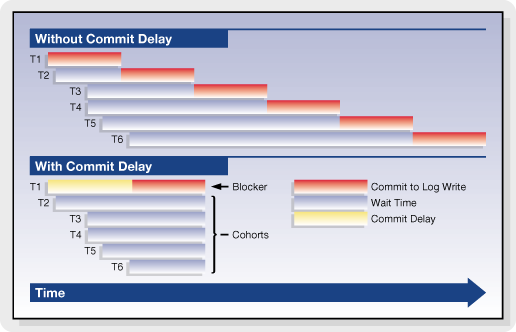
The above figure shows the effect of commit delay on the commit times for individual threads. The left side of the figure shows the situation when commit delay is disabled. The right side shows the situation when commit delay is enabled. This example shows six threads (labeled T1 through T6) with random arrival times in the transaction commit log flush logic. In this example, the thread T1 arrives first, followed by thread T2 and so on through thread T6.
When commit delay is disabled, each thread flushes the transaction log in turn. The shaded part of the rectangles represents the time spent by each thread flushing the transaction log. Thread T1 flushes first. T2 waits until T1's flush completes and then performs its flush, and so on.
When commit delay is enabled, the first thread entering the commit delay logic becomes the blocker (thread T1 in this example). Threads entering the commit delay logic after this point in time (threads T2 through T6) become cohorts. The blocker sleeps for the commit delay period and then flushes the transaction log. The cohorts sleep until the blocker has finished flushing the transaction log and has released the block, at which point they acquire and release the block and complete their commit without flushing the transaction log.
An exception to the "blocker - cohort" concept arises when the log buffer becomes full prior to the delay period. In this instance, the cohort will flush thus releasing the blocker. Statistics are captured to measure this occurrence and to assess how the transactions flow through the commit delay logic.
Enabling Transaction Commit Delay
Commit delay can be enabled using either of these server configuration keywords:
COMMIT_DELAY <milliseconds>where <milliseconds> is the commit delay interval specified in milliseconds, or:
COMMIT_DELAY_USEC <microseconds>where <microseconds> is the commit delay interval specified in microseconds (one millisecond is 1000 microseconds).
If both forms of the commit delay keyword are used, then the last entry in the configuration file prevails.
Reduced Flushing of Updated Cache Pages
FairCom DB follows a buffer aging strategy, which ensures updated cache pages for transaction-controlled files are eventually flushed to disk. The factors that affect when a buffer is flushed include the number of times a buffer has been updated and the number of checkpoints that have occurred since the buffer was last flushed. This section describes ways to tune the FairCom DB buffer aging strategy to avoid unnecessary flushing of updated buffers for transaction-controlled files.
Transaction Flushing
The TRANSACTION_FLUSH configuration options controls the aging of updated buffers based on the number of times a buffer has been updated since it was last flushed.
TRANSACTION_FLUSH <num_updates> sets the maximum number of updates made to a data or index cache page before it is flushed. The default value is 500000. Increasing this value reduces repeated flushing of updated cache pages that may occur in a system that maintains a high transaction rate with a pattern involving frequently updating the same buffers.
Checkpoint Flushing
The CHECKPOINT_FLUSH server configuration keyword controls the aging of updated buffers based on the number of checkpoints that have occurred since the buffer was last flushed.
CHECKPOINT_FLUSH <num_chkpnts> sets the maximum number of checkpoints to be written before a data or index cache page holding an image for a transaction controlled file is flushed. Increasing this value avoids repeated flushing of updated cache pages that may occur in a system that maintains high transaction rates. When CHECKPOINT_FLUSH is increased, FairCom DB automatically detects the reliance on previous transaction logs and increases the active log count as needed.
The following formula estimates the number of logs required to support unwritten updated cache pages:
Let:
   CPF =  CHECKPOINT_FLUSH value
   CPL =  # of checkpoints per log (typically 3 and no less than 3)
   MNL = minimum # of logs to support old pages
Then:
MNL = ((CPF + CPL - 1) / CPL) + 2, where integer division is usedNote FairCom DB does not use this formula. It dynamically adjusts for actual "recovery vulnerability" to determine exactly what logs are required for recovery.
Example
CPF=2, CPL=3 => MNL = 3 (but the server enforces a minimum of 4)
CPF=19, CPL=3 => MNL = 9 active transaction logs
Improved Log Flush Strategy
The primary performance impact of transaction control is the result of flushing critical data to the transaction logs. Prior to V8.14, the FairCom Server flushed data to the transaction logs by issuing a write to the filesystem cache and then calling a system function to flush filesystem cache buffers to disk. FairCom found the most efficient way to flush data to the transaction logs is to open the logs using a synchronous write mode, in which writes bypass filesystem cache and write directly to disk.
FairCom Server versions 8.14 and later support transaction log write through using the following server configuration options for opening transaction logs in synchronous write mode:
-
COMPATIBILITY LOG_WRITETHRUis used on Windows systems to instruct FairCom DB to open transaction logs in synchronous write mode. In this mode, writes to the transaction logs go directly to disk (or disk cache), avoiding filesystem cache, so the server avoid the overhead of first writing to the file system cache and then flushing the file system. -
COMPATIBILITY SYNC_LOGis used on Unix systems to instruct the c-tree FairCom DB to open its transaction logs in synchronous write (direct I/O on Solaris) mode. In this mode, writes to the transaction logs go directly to disk (or disk cache), avoiding the file system cache, so the server is able to avoid the overhead of first writing to the file system cache and then flushing the file system cache buffers to disk. This keyword also causes flushed writes for data and index files to use direct I/O. Using this keyword enhances performance of transaction log writes. (This option is deprecated as of V9 and replaced withCOMPATIBILITY LOG_WRITETHRUfor all platforms.)
Checkpoint Efficiency
Checkpoints are point-in-time snapshots of FairCom DB transaction states. FairCom DB writes checkpoints to the current transaction log at predetermined intervals. The most recent checkpoint entry placed in the transaction logs identifies a valid starting point for automatic recovery.
The interval at which checkpoints are written to the transaction log is determined by the server's CHECKPOINT_INTERVAL configuration keyword. This keyword specifies the number of bytes of data written to the transaction logs after which the server issues a checkpoint. It is ordinarily about one-third (1/3) the size of one of the active log files (Lnnnnnnn.FCS).
High transaction rate environments tend to generate large numbers of dirty cache pages which are flushed to disk during checkpoint processing. FairCom recommends increasing the checkpoint interval in these cases such that checkpoints occur less frequently reducing the volume of data flushed during the checkpoint. This can reduce the periodic latencies observed during checkpoint processing resulting in "flatter" overall I/O rates, and generally, overall better throughput.
Increasing the Interval Between Checkpoints
Two configurations interact in determining the minimum checkpoint interval.
- Because the server enforces a minimum of three checkpoints per transaction log, increase the size of the transaction logs using the
LOG_SPACEkeyword. SetLOG_SPACEto 12 times the desired checkpoint interval to accommodate three checkpoints per log for four active transaction logs. - Set the
CHECKPOINT_INTERVALsetting to the desired checkpoint interval.
For example, to set the checkpoint interval to 20 Mb, use a combination of these configuration options:
LOG_SPACE 240
CHECKPOINT_INTERVAL 20000000
Transaction Log Templates
Critical state information concerning ongoing transactions is saved on a continual basis in the transaction log file. A chronological series of transaction log files is maintained during FairCom DB operation. Transaction log files containing actual transaction information are saved as ordinary files and given names in sequential order, starting with L0000001.FCS (which can be thought of as "active FairCom Server log, number 0000001") and incrementing sequentially (i.e., the next log file is L0000002.FCS, etc.). By default, FairCom DB retains up to four active logs at a given time.
By default, transaction log files are extended and flushed to ensure log space is available. Transaction logs are also 0xff filled to ensure known contents. The 0xff filling of the log file (and forcing its directory entries to disk) occurs during log write operations. For high transaction rate systems, this means log file processing is frequently busy with extension and fill processing, leading to increased latency for transactions in progress when log extension occurs.
Transaction log templates allows high throughput systems to maintain one or more preformed transaction logs ready to use. With log templates enabled, an empty log file is created at server startup, L0000000.FCT, to serve as a template. The first actual full log, L0000001.FCS, is copied from this template as well as the next blank log, L0000002.FCT. Whenever a new log is required, the corresponding blank log file is renamed from L000000X.FCT to L000000X.FCS and, asynchronously, the next blank log, L000000Y.FCT, is then copied from the template.
Log Template Configuration
Enable the log template feature by specifying the server keyword LOG_TEMPLATE in the server configuration file.
LOG_TEMPLATE <n>where <n> is the number of log templates you want the server to maintain. The default is 0, which means no use of log templates. For instance, a value of two (2) means that two blank logs (L0000002.FCT and L0000003.FCT) would be created at first server startup in addition to the template (L0000000.FCT).
Prior to using the log template feature, existing transaction logs must be deleted to cause the server to create log templates. To do this, follow these steps:
- Perform a controlled shutdown of the FairCom Server.
- Block the ability of any clients to attach to the FairCom Server.
- Perform a second controlled shutdown of the FairCom Server.
- Remove all existing transaction logs and associated files: Lnnnnnnn.FCS, S0000000.FCS, and S0000001.FCS.
- Unblock the ability of clients to attach to the FairCom Server and restart it.
When the server is restarted after adding this keyword, startup may take longer due to creation of template log files (*.FCT).
Note For more information, consult the procedures in the Knowledgebase section titled Steps to Upgrade FairCom Server to find out how to cleanly shut down, delete the logs, and restart. Because you are not upgrading FairCom Server, you will ignore the step that tells you to copy the ctsrvr.exe or faircom.exe file.
Limitations
Log templates are not supported when mirrored logs or log encryption is in use.
Efficient Transaction Log Template Copies
The log template feature is a fast and efficient means of creating transaction logs in high volume systems. An initial transaction log template is created and copied when a new transaction log is required.
The original implementation used an operating system file copy command (for example., cp L0000002.FCT L0000002.FCS) to initiate the copy of the template to the newly named file. This approach required the full contents of the template file to be read. For systems experiencing high volume transaction loads where a template is frequently copied, this method placed unnecessary demand on system resources.
An improved efficient method for copying transaction log template file is available.
Template Copy Options
The following configuration options can be used to modify the speed of copying a log template such that log template disk write performance impact is reduced.
Copy Sleep Time
LOG_TEMPLATE_COPY_SLEEP_TIME <milliseconds>This keyword results in the copying of the log template to be paused for the specified number of milliseconds each time it has written the percentage of data specified by the LOG_TEMPLATE_COPY_SLEEP_PCT option to the target transaction log file.
- Default value:
0(disabled) - Minimum value:
1 - Maximum value:
1000(1 second sleep)
Copy Sleep Percentage
LOG_TEMPLATE_COPY_SLEEP_PCT <percent>This keyword specifies the percentage of data that is written to the target transaction log file after which the copy operation sleeps for the number of milliseconds specified for the LOG_TEMPLATE_COPY_SLEEP_TIME option.
- Default value:
15 - Minimum value:
1 - Maximum value:
99
Example
The following example demonstrates the options that cause the copying of the log template file to sleep for 5 milliseconds after every 20% of the transaction log template file has been copied:
LOG_TEMPLATE_COPY_SLEEP_TIME 5
LOG_TEMPLATE_COPY_SLEEP_PCT 20
Note If an error occurs using this method an error message is output to CTSTATUS.FCS (identified with the "LOG_TEMPLATE_COPY: ..." prefix) and FairCom DB then attempts the log template system copy method.
Efficient Flushing of Transaction Controlled Files
Similar to the strategy used in transaction log flushing (see COMPATIBILITY LOG_WRITETHRU), FairCom DB can flush transaction controlled data and index files with a file access mode bypassing filesystem cache. Two configuration options enable this behavior.
COMPATIBILITY TDATA_WRITETHRU and COMPATIBILITY TINDEX_WRITETHRU force transaction controlled data files and index files, respectively, to be written directly to disk (whenever c-tree determines they must be flushed from cache), and calls to flush their OS buffers are skipped.
Extended Transaction Number Support
The FairCom Server transaction processing logic uses a system of transaction number high-water marks to maintain consistency between transaction controlled index files and the transaction log files. This section explains that logic.
Extended Transaction Number Support
The FairCom transaction processing logic used by the FairCom Server uses a system of transaction number high-water marks to maintain consistency between transaction controlled index files and the transaction log files. When log files are erased, the high-water marks maintained in the index headers permit the new log files to begin with transaction numbers which are consistent with the index files.
With previous releases, if the transaction number high-water marks exceed the 4-byte limit of 0x3ffffff0 (1,073,741,808), then the transaction numbers overflow, which will cause problems with the index files. On file open, an error MTRN_ERR (533) is returned if an index file's high-water mark exceeds this limit. If a new transaction causes the system's next transaction number to exceed this limit, the transaction fails with a OTRN_ERR (534).
6-byte transaction numbers essentially eliminate this shortcoming. With this new feature, 70,000,000,000,000 transactions can be performed before server restart. A transaction rate of 1,000 transactions per second would not exhaust the transaction numbers now available for over 2,000 years.
Note The Xtd8 file create and rebuild functions must be used in order to create files with 6-byte transaction number support. If a non-Xtd8 file create function like
CreateIFileXtd()is used to create index files, the index file is created without an extended header, so it cannot support 6-byte transaction numbers.
CreateIFileXtd8(), PermIIndex8(), TempIIndexXtd8(), and RebuildIIfileXtd8() are examples of functions that can be used to create indexes with extended headers.
Even if the specified extended file mode does not include the 6-byte transaction number support flag (ct6BTRAN), c-tree defaults to using that option when a file is created with an extended header.
In c-tree Plus V8 and later, 6-byte transaction numbers are used by default. They will not be used on an individual file creation in the following cases:
- If there is no extended create block; or
- If the ctNO6BTRAN bit in the x8mode member of the extended file create block (
XCREblk) is turned on; or - If the
ctNO_XHDRSbit is turned on in x8mode.
You can override the default so that 4-byte transaction numbers are instead used by default by adding the COMPATIBILITY 6BTRAN_NOT_DEFAULT keyword to the server configuration file.
Ordinary data files are unaffected by this modification, and they are compatible back and forth between servers with and without 6-byte transaction support. Except for superfile hosts, the ct6BTRAN mode is ignored for data files. Index files and superfile hosts are sensitive to the ct6BTRAN mode: (1) an existing index file or superfile supporting only 4-byte transaction numbers must be converted or reconstructed to change to 6-byte transaction number support; and (2) the superfile host and all index members of a superfile must agree on their ct6BTRAN mode (either all must have the ct6BTRAN mode on or all must have it off), or a S6BT_ERR (742) occurs on index member creation.
Note A previously existing index will only use 4-byte transaction numbers and an attempt to go past the (approx.) 1,000,000,000 transaction number limit will result in an
OTRN_ERR(534). See Section 3.11.4 "Transaction High Water Marks" in the FairCom DB Programmer’s Reference Guide for more information.Files supporting 6-byte transactions are not required to be huge, but they do use an extended header.
An attempt to open a file using 6-byte transactions by code that does not support 6-byte transactions will result in HDR8_ERR (672) or FVER_ERR (43).
Configurable Extended Transaction Number Options
To check for files that do not support extended transaction numbers, add the following keyword to the FairCom Server configuration file:
DIAGNOSTICS EXTENDED_TRAN_NOThis keyword causes the server to log each physical open of a non-extended transaction number file to the CTSTATUS.FCS file. The reason to check for a file that does not support extended transaction numbers is that if all files do not support extended transaction numbers, then the exceptions could cause the server to terminate if the transaction numbers exceed the original 4-byte range and one of these files is updated. By "all files" we mean superfile hosts and indexes; data files are not affected by the extended transaction number attribute.
To enforce the use of only files with extended transaction numbers, add the following keyword to the FairCom Server configuration file:
COMPATIBILITY EXTENDED_TRAN_ONLYThis keyword causes a R6BT_ERR (745) on an attempt to create or open a non-extended-transaction-number file. A read-only open is not a problem since the file cannot be updated.
These configuration options have no effect on access to non-transaction files, as transaction numbers are not relevant to non-transaction files.
Configurable Transaction Number Overflow Warning Limit
When FairCom DB supports 6‑byte transaction numbers it does not display transaction overflow warnings until the current transaction number approaches the 6‑byte transaction number limit. But if 4‑byte transaction number files are in use, a key insert or delete will fail if the current transaction number exceeds the 4‑byte transaction number limit (however, FairCom DB will continue operating).
To allow a server administrator to determine when the server’s transaction number is approaching the 4‑byte transaction number limit, the following configuration option was added:
TRAN_OVERFLOW_THRESHOLD <transaction_number>This keyword causes the c-tree Server to log the following warning message to CTSTATUS.FCS and to standard output (or the message monitor window on Windows systems) when the current transaction number exceeds the specified transaction number:
WARNING The current transaction number (####) exceeds the user-defined threshold.
The message is logged every 10000 transactions once this limit has been reached. The TRAN_OVERFLOW_THRESHOLD limit can be set to any value up to 0x3ffffffffffff, which is the highest 6‑byte transaction number that FairCom DB supports.
Efficient Single Savepoint for Large Transactions
The FairCom Server uses the ReplaceSavePoint() function internally to provide a fast, efficient means to carry along a save point in large transactions, so that an error can be undone by calling RestoreSavePoint() and then continuing the transaction. Compared to SetSavePoint(), which inserts a separate save point for each call, ReplaceSavePoint() simply updates some pre-image space links to effectively move the save point.
The ReplaceSavePoint() API call is now included in the c-tree client API. If your c-tree application needs the ability to undo only the last change in a transaction consider using ReplaceSavePoint().
Deferred Flush of Transaction Begin
It is not uncommon for a higher-level application API to start transactions without knowledge of whether or not any updates will occur. To reduce the overhead of unnecessary log flushes, FairCom added a new transaction mode, ctDEFERBEG, to the c-tree API function Begin(), used to begin a transaction. ctDEFERBEG causes the actual transaction begin entry in the log to be delayed until an attempt is made to update a transaction-controlled file, and if a transaction commit or abort is called without any updates, then the transaction begin and end log entries are not flushed to disk.
FairCom applied this change after finding that FairCom DB SQL SELECT statements performed in auto-commit mode involved transaction log activity due to transaction begin and abort calls. FairCom DB SQL now includes this ctDEFERBEG mode in transaction begin calls, eliminating transaction log I/O for transactions that do not involve updates. If your application begins transactions that might not involve updates, consider adding ctDEFERBEG to your transaction begin calls.
Detection of Transaction Log Incompatibilities
FairCom DB transaction log formats periodically change as new features are added. Previously, error LFRM_ERR (666) indicated an existing transaction log was not compatible with the server or stand-alone application trying to read a log file at the start of execution.
A forward compatibility check, with description codes are now placed in CTSTATUS.FCS with additional details about log incompatibility. The forward compatibility check fails if an older build detects that transaction log requiring a feature not supported in the old logic.
Details about log incompatibility are demonstrated in this sample output:
Fri Sep 02 13:27:02 2005
  - User# 00001  Incompatible log file format...[7: 00400200x 00600290x]
The additional details are contained in the square brackets. The first number is an incompatibility code as described in the following table.
| Incompatibility Code | Description |
|---|---|
1 |
Log does not support HUGE files. |
2 |
Log requires HUGE file support. |
3 |
Log does not support 6-byte transaction numbers. |
4 |
Log requires 6-byte transaction numbers. |
5 |
Forward compatibility error: compare the two hex words. |
6 |
Log does not support extended TRANDSC structure (ctXTDLOG). |
7 |
Log requires extended TRANDSC support (ctXTDLOG). |
8 |
Log does not support log compression (ctCMPLOG). |
9 |
Log requires log compression support (ctCMPLOG). |
The two hex numbers in the square brackets are bit maps. The first is derived from the log file and the second is from the build line. When the first number in the square brackets is 5, bits turned on in the first hex word, but not in the second hex word indicate which features the log requires that the logic does not support.
Millions of Records per Transaction
Large transactions are sometimes unavoidable. Recently presented situations include a case where a large-scale database purge included many cross-referenced tables. Another case involved a full data table version update. In both cases, the transaction size challenged existing limits of performance. Ultimately, regardless of size, database changes must persist to the write-ahead log for atomicity and recovery. FairCom database optimizations make these as fast as possible rivaling, or beating other database comparisons.
FairCom DB can efficiently support large transactions without consuming excessive memory. Enhanced configuration options limit the amount of data stored in memory during a transaction. After the transaction has reached this limit, the server creates a swap file and stores subsequent data in the swap file.
Note that internal structures remain allocated, so memory use still increases somewhat. However, as record images and key values are temporarily written to the swap file, memory usage is greatly reduced when updating many records or very large records.
This feature is controlled with the following configuration options in ctsrvr.cfg:
-
MAX_PREIMAGE_DATA <limit>sets the maximum size of in-memory data that is allocated by a transaction to<limit>. After this data limit has been reached, subsequent allocations are stored in a preimage swap file on disk. The default value is 1 GB. -
MAX_PREIMAGE_SWAP <limit>sets the maximum size of the preimage swap file on disk. If the file reaches its maximum size and a transaction attempts to allocate more space in the file, the operation fails with errorTSHD_ERR(72). The default value is zero (meaning no limit).
Security Note: The preimage swap file contains data record images and key values that the transaction updated. Note that even if the corresponding data file or index file has encryption enabled, the preimage swap file contents are only encrypted if the LOG_ENCRYPT configuration option is used. If advanced encryption is enabled, the preimage swap file is encrypted using the AES-32 cipher. If not, the preimage swap file uses FairCom's proprietary ctCAMO algorithm, which is a simple masking of the contents, it is not a form of industry-standard encryption.
Changes to Hashing and PREIMAGE_HASH_MAX
When updating many records in one transaction, the update rate slowed over time. This happened even if a table lock was acquired on the table and preimage memory use was reduced with the MAX_PREIMAGE_DATA configuration option.
A hash table is used to efficiently search preimage space entries containing updated record images. This modification improves the hash function in these areas:
- It no longer imposes a limit of 1048583 hash bins.
- Improved the hash function to provide a more even distribution of the values over the hash bins.
For maximum performance, the hash function can now use up to 2^31-1 hash bins. We also modified the lock hash function in the same manner.
Prior to this change, dynamic hashing defaulted to a maximum number of hash bins of 128K. PREIMAGE_HASH_MAX can raise this limit.
Hint
PREIMAGE_HASH_MAXandLOCK_HASH_MAXkeyword values larger than 1 million can provide additional performance benefits for large transactions.
Default: The default value for the PREIMAGE_HASH_MAX configuration option has been changed from 131072 to 1048576 so that our dynamic hash of the preimage space entries can be more effective for large transactions without requiring the server administrator to remember to increase this setting.